What is the easiest way to video call grandparents?
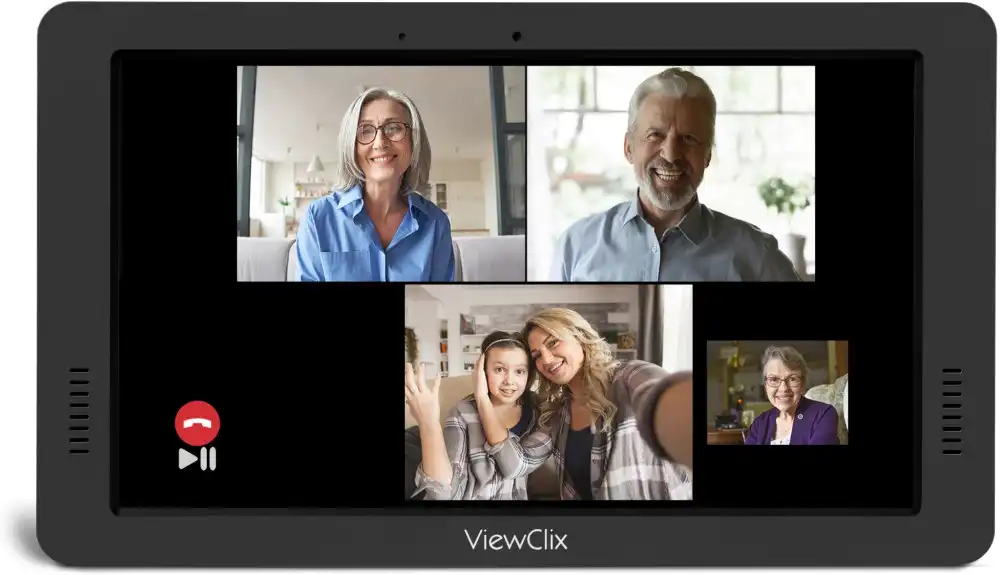
The easiest way to video call grandparents is to use a device that requires nothing from the senior — one that answers calls automatically when family initiates them. ViewClix does exactly this. Grandparents do not need to answer a phone, tap a screen, or navigate any menus. When a family member starts a call, the ViewClix frame answers immediately. For grandparents who struggle with technology, this removes every barrier at once.
How ViewClix Makes Video Calling Effortless
ViewClix is a smart frame designed specifically to remove the technology barrier for seniors. It sits in a prominent spot in the home and displays family photos all day long. When a family member starts a video call through the ViewClix app, the frame automatically answers — no tapping, no typing, no setup steps for the grandparent. Up to three family members can join a single call. Family members manage everything from a phone app, and no technical knowledge is required from the senior at all.
Explore ViewClix featuresWhy Video Calling Grandparents Can Be Difficult
Video calling is one of the most meaningful ways for grandchildren and grandparents to stay connected, especially when they live far apart. But technology often creates barriers that prevent regular calls from happening.
Complex interfaces and apps
Most video calling apps are designed for general audiences and include dozens of features that are irrelevant to simple family calls. For a grandparent unfamiliar with smartphones, even basic steps like opening an app, navigating to a contact, and initiating a call can feel overwhelming.
Too many steps to answer
By the time a senior has located their device, unlocked the screen, opened the right app, and found the incoming call notification, family members may have already given up. Calls get missed, and that missed connection compounds over time.
Passwords and account setup
Platforms like FaceTime, Zoom, and Google Meet all require account creation, app installation, and sometimes ongoing updates. For many seniors, the initial setup is the hardest part — and without in-person help, it becomes a barrier that never gets resolved.
Physical factors that create friction
Small text, tiny buttons, and fast-moving notifications can be difficult for seniors with reduced vision or limited dexterity. These physical challenges make even simple tasks harder than expected.
Choosing the Right Device for Video Calling Grandparents
Different devices suit different situations. Here are the main options families consider:
Smartphones
Smartphones work for grandparents who are already comfortable using them. Apps like FaceTime (for iPhone users) and Google Meet work well. The challenge is ensuring that grandparents are confident enough navigating the device to answer a call quickly when it arrives.
Tablets
Tablets offer larger screens and may be easier to see. An iPad with FaceTime is a popular choice for seniors who have some tech familiarity. However, tablets still require account login, updates, and some navigation skill.
Smart TVs and video calling kits
Some families set up video calling through smart TVs, which provide large screens. These setups often require a connected camera and some technical configuration.
Dedicated senior video calling devices
Devices like ViewClix are specifically designed for this use case. They require no setup from the grandparent, display family photos automatically, and handle video calls with no interaction needed from the senior end. This is often the most reliable and sustainable option for families with grandparents who are not comfortable with technology. Families comparing different setups can read more about video calling for seniors.
Setting Up Video Calls for Grandparents Step by Step
Step 1: Choose a device and platform
Pick one platform and stick with it. Mixing FaceTime calls on one visit and Zoom calls on another creates confusion. Consistency builds familiarity.
Step 2: Set up the account and test the connection
Create accounts and test calls before involving the grandparent. Resolve any connection or audio issues first so the first experience feels smooth.
Step 3: Introduce the device with in-person support
The first few calls are most successful when a family member is physically present to guide the grandparent through the process. Make the first call a positive, low-pressure experience.
Step 4: Practice and repeat
Regular calls build familiarity. A weekly video call at the same time each week helps grandparents develop consistent habits and reduces uncertainty about what to expect.
Step 5: Simplify where possible
Large text settings, simplified home screen layouts, and written reminders placed near the device can all reduce friction for seniors who are learning to use video calling on their own.
Making Video Calls a Regular Habit
Consistency matters as much as setup. Families who schedule a regular call time — Sunday afternoons, for example — tend to maintain stronger connections than families relying on spontaneous calls. When grandparents know when to expect a call, they feel more prepared and less surprised by incoming video.
For grandparents who find any technology challenging, tools like ViewClix make it possible to call every day without placing any demands on the senior. Between calls, many families also look for simple ways to share photos with grandparents so the connection continues throughout the week.
If you are building a broader routine around calls, photos, and regular check-ins, our guide to staying connected with aging parents is the best next step.
How ViewClix works